
AI has made website creation faster. A person with no design experience can open Lovable or Figma Make and generate a homepage from words. If you’re doing it for the first time, your reaction will be like, “Wow, how did it do that?”
Then you ask it to adjust the layout. A few prompts later, you’re still explaining to AI what you want from it. At such moments, those initial five minutes of AI magic start to feel less magical, right?
So, don’t set your expectations too high. Yes, AI can create a working site in minutes, but it won’t give you a finished website that explains your product and builds trust with customers out of the box. Of course, a lot depends on which AI builder you use.
To help you pick, we’ve reviewed the best AI tools for website design. We’ve analyzed how far the first version gets you and dug into user reviews. It’s always good to know what people think after a few prompts.
The best AI tools for website design: Which one should you try?
Some tools on this list help you explore layouts. Others turn your ideas into interactive prototypes or live websites. Their features overlap, so we focused on what each one does best.
To give you an idea of how they perform, we gave each AI tool the same brief and captured what it produced (you'll find the screenshots in each tool's section). Here’s the prompt we used:
“Create a homepage for BigRoutes, a mobile app that builds personalized hiking routes based on your fitness level and the time you have. Include a hero, how-it-works, featured trails, and a download CTA.”
Framer
Best for marketing websites with custom layouts and animations
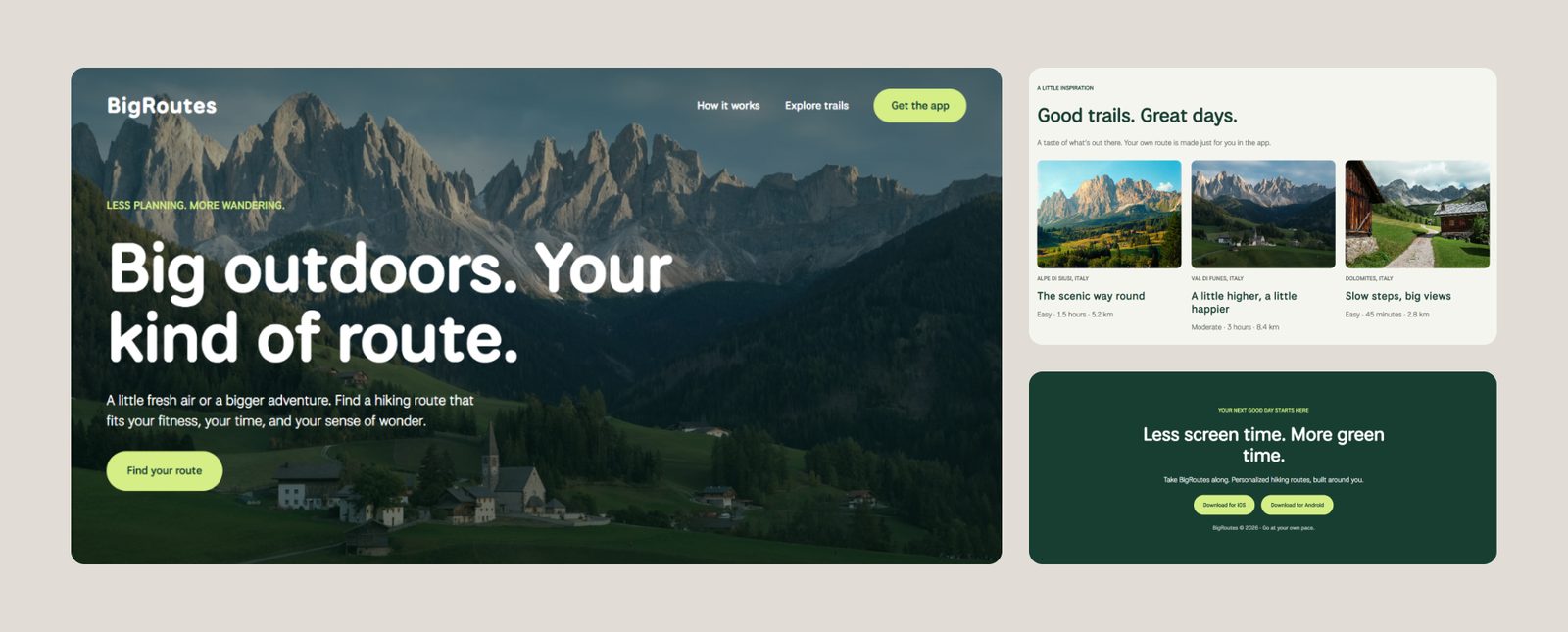
Framer is not a newcomer on the market. Before AI, it was a popular tool for designing websites.
In 2026, Framer introduced AI agents that can do design work based on your prompts. Describe the website you want, and it generates pages on the canvas. The first design might look generic. You can ask AI to make changes, but if you'd rather tweak something yourself, the regular visual editor is right there.
That's why Framer is interesting for designers. Instead of relying on prompts, you can adjust typography, spacing, animations, and responsive layouts. Framer also includes a CMS for managing content, SEO tools, and hosting, so you can take a website from the first design to a live URL without leaving the platform.
You don't need coding experience to use Framer, but according to G2 reviews, there's a learning curve if you've come from Figma, for example. On Reddit, users are impressed by how well the agent follows instructions, but credits disappear very fast.
Consider Framer if you want to speed up website creation with AI, but need to keep control over the visual details.
Figma Make
Best for testing ideas with clickable prototypes
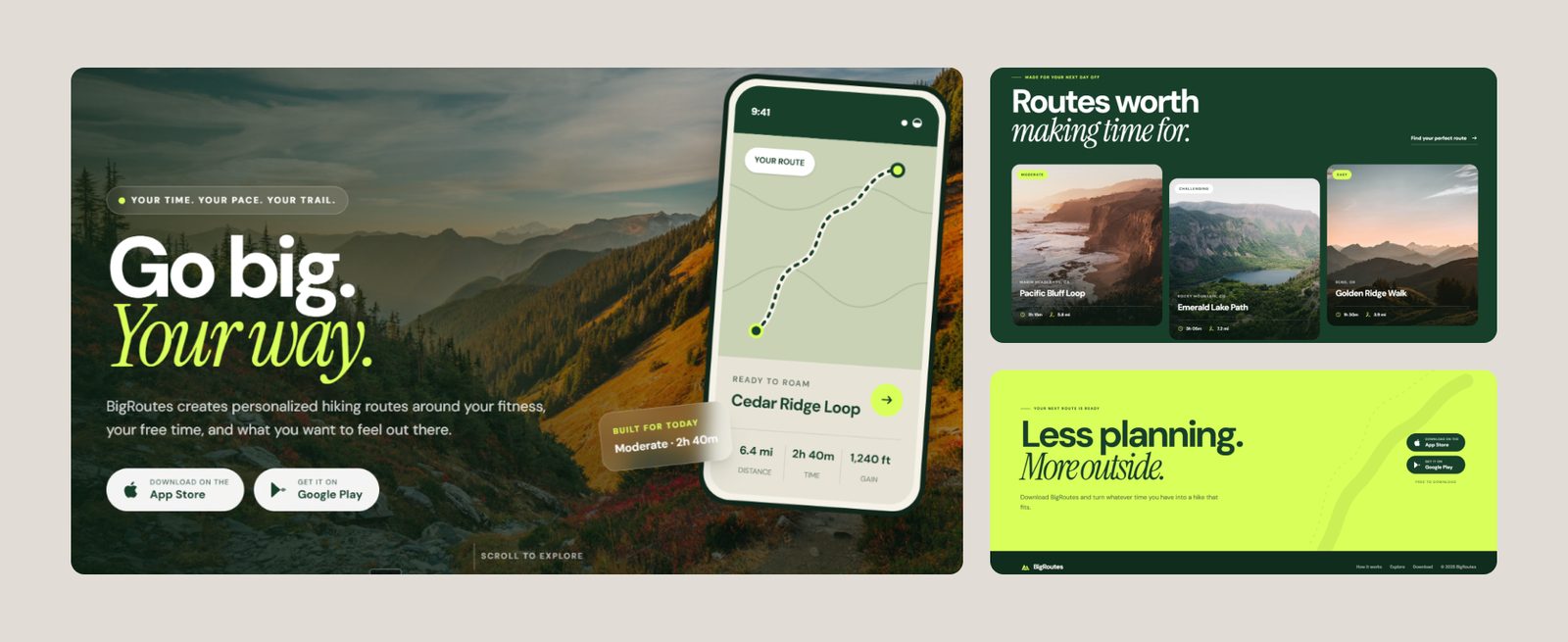
Figma Make is a prompt-to-app tool that can turn a text prompt into a clickable prototype. Say you need to create an interactive UI. You start with a plain-language instruction, and Make generates an interface with buttons and navigation. You can share it for collaboration or publish it.
When working with Make, it’s important to give it precise prompts. People recommend using other AI tools for generating prompts to get a more accurate output. Even better when you give it your existing style guide or design system. Just keep an eye on the result, as Make doesn't always use design system components correctly. Sometimes, changing one element can affect or even break something else.
You shouldn’t mix Figma Make and traditional Figma Design, which also has AI features. Make generates working interfaces using code, but you don't get the same layer-by-layer design workflow as in a regular Figma file.
Consider Figma Make if you work in the Figma ecosystem. You can use it to test product ideas and collect feedback before you invest in a full build.
Google Stitch
Best for experimenting with different UI directions
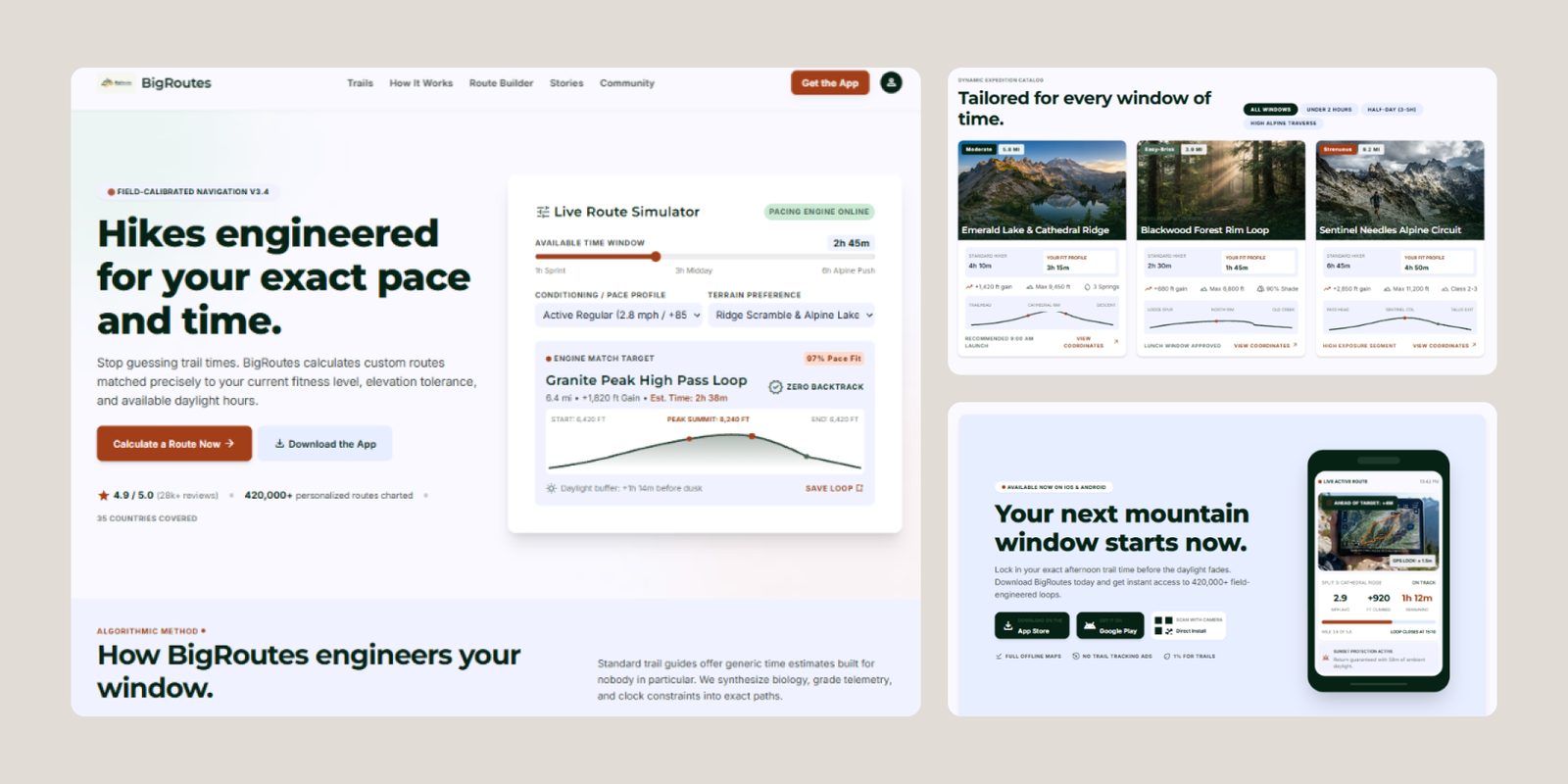
Google Stitch is an AI-powered design tool from Google Labs. It works well when you have a rough idea for a website and want to visualize it fast. You can explore different layouts and interface elements, then move the design into Figma for further work.
Google continues experimenting with Stitch. They introduced interactive prototyping and, in May 2026, added real-time design collaboration, voice input, and options to publish work to the web.
People like that Stitch can visualize their ideas in minutes. Still, some reviewers flagged inconsistencies in the top navigation of generated pages. Others called the created designs too generic, or claimed Stitch needs very granular instructions to produce decent results.
Consider Stitch if you want to explore several visual directions or experiment with interface flows.
v0 by Vercel
Best for teams comfortable with code
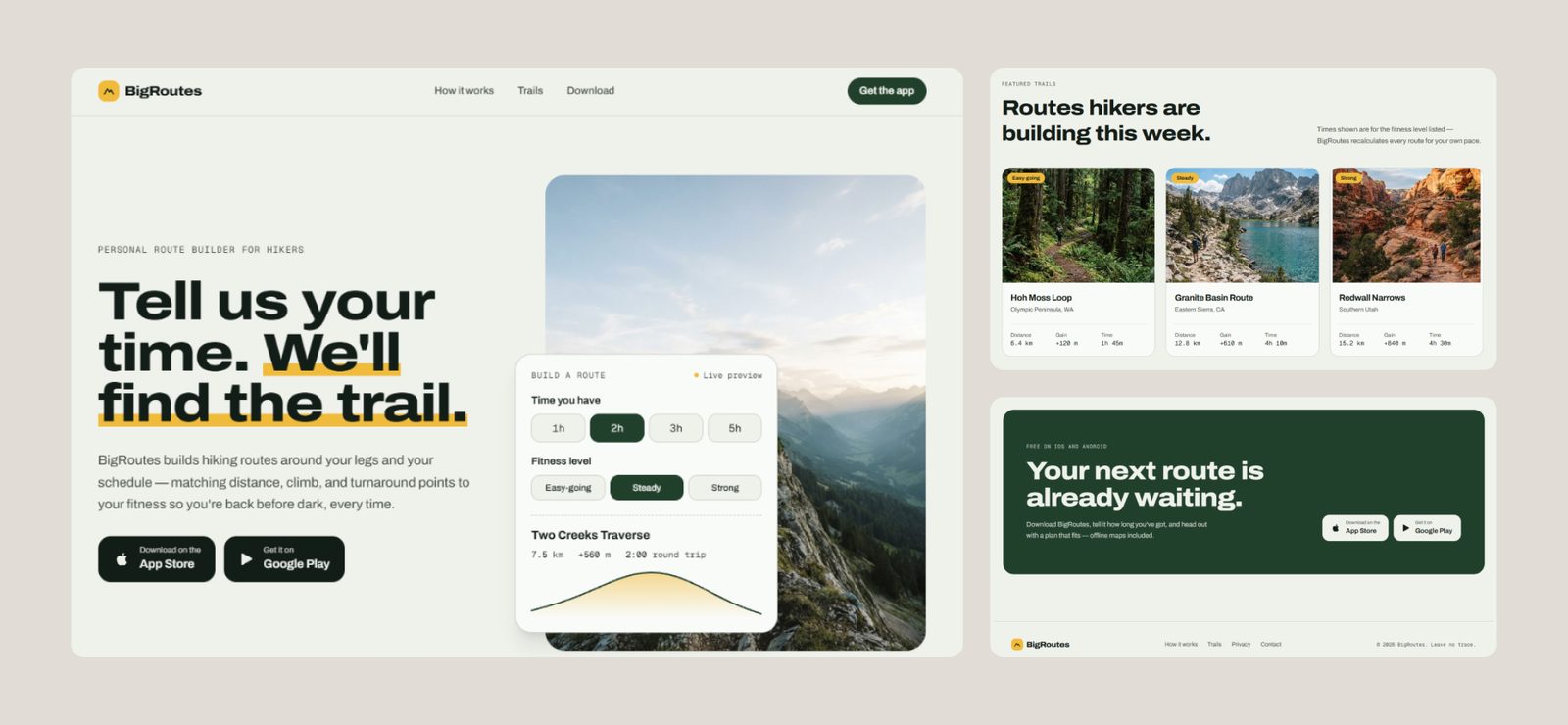
When Vercel launched v0, it was an AI-powered tool for generating UIs only. You could describe what you want to build, like a pricing table or a landing page, and v0 would generate React components. Today, v0 can create an entire website or web app with the functionality behind it. You can start a new project from scratch or import an existing one from GitHub, then publish it to Vercel in one click.
Many reviewers say v0 is strong on design quality and speed. For example, one founder describes how they built a marketing site in very little time. However, complex features touching the backend may require additional development. And the more you go back and forth with AI, the faster you might use up your credits.
Consider v0 if you're confident with code or have developers who can refine what AI generates.
Relume
Best for planning and structuring multi-page marketing websites
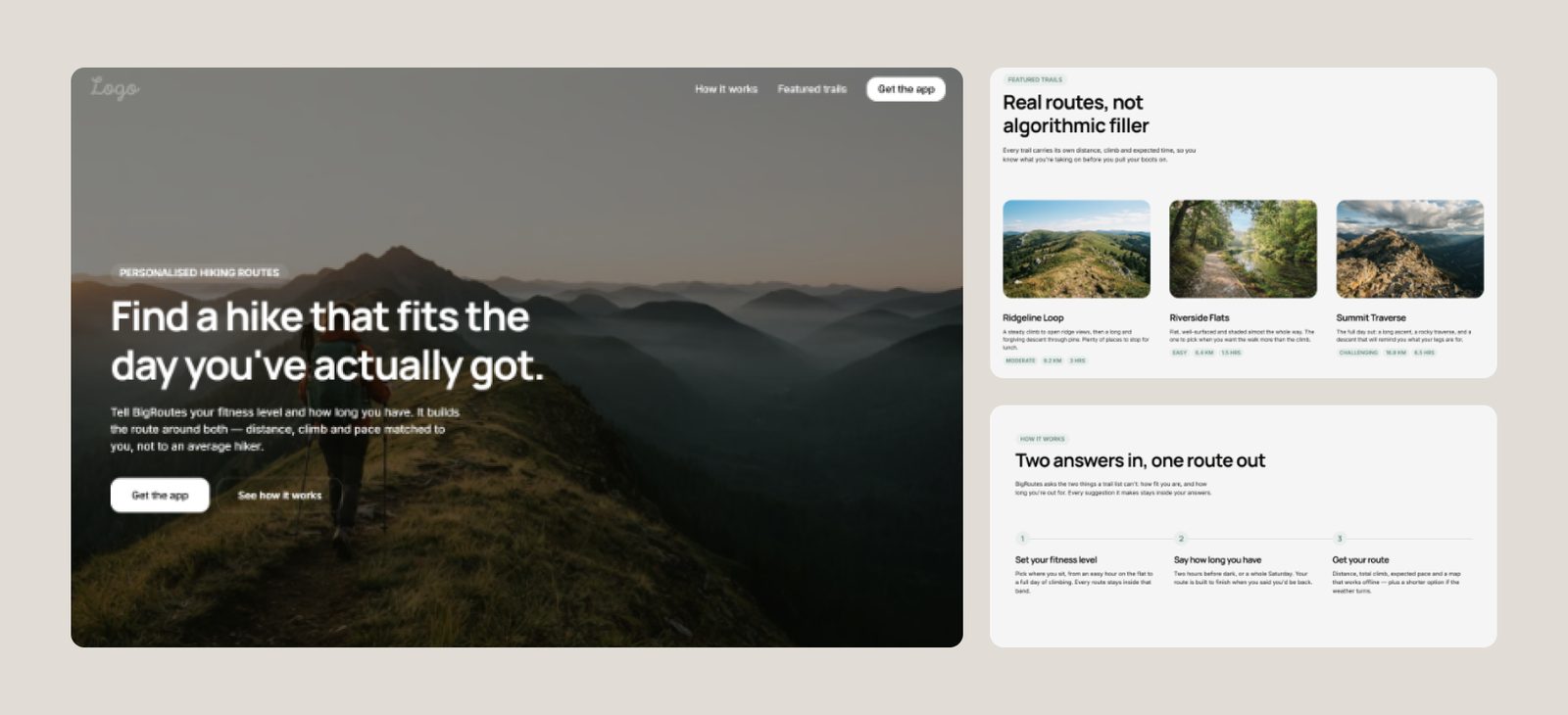
Relume started as a library of customizable components for Webflow and Figma. Later, it added generative AI to help users plan websites with editable sitemaps and wireframes. Today, you can start with a website brief, then move through the sitemap, wireframe, and design stages. You may rearrange sections, swap components, and edit the suggested copy.
Sometimes generated wireframes need refinement. For example, one Reddit user complained about repetitive layout suggestions and inconsistent section choices, like multiple footer designs on the same site.
In August 2026, Relume introduced Relume Publish, currently in beta. It lets you build, host, and publish websites directly in Relume. So now, it can take you from the initial sitemap to a live website.
Consider Relume if you plan the structure of a multi-page marketing website or want to experiment with page layouts.
Webflow AI
Best for marketing websites that keep growing
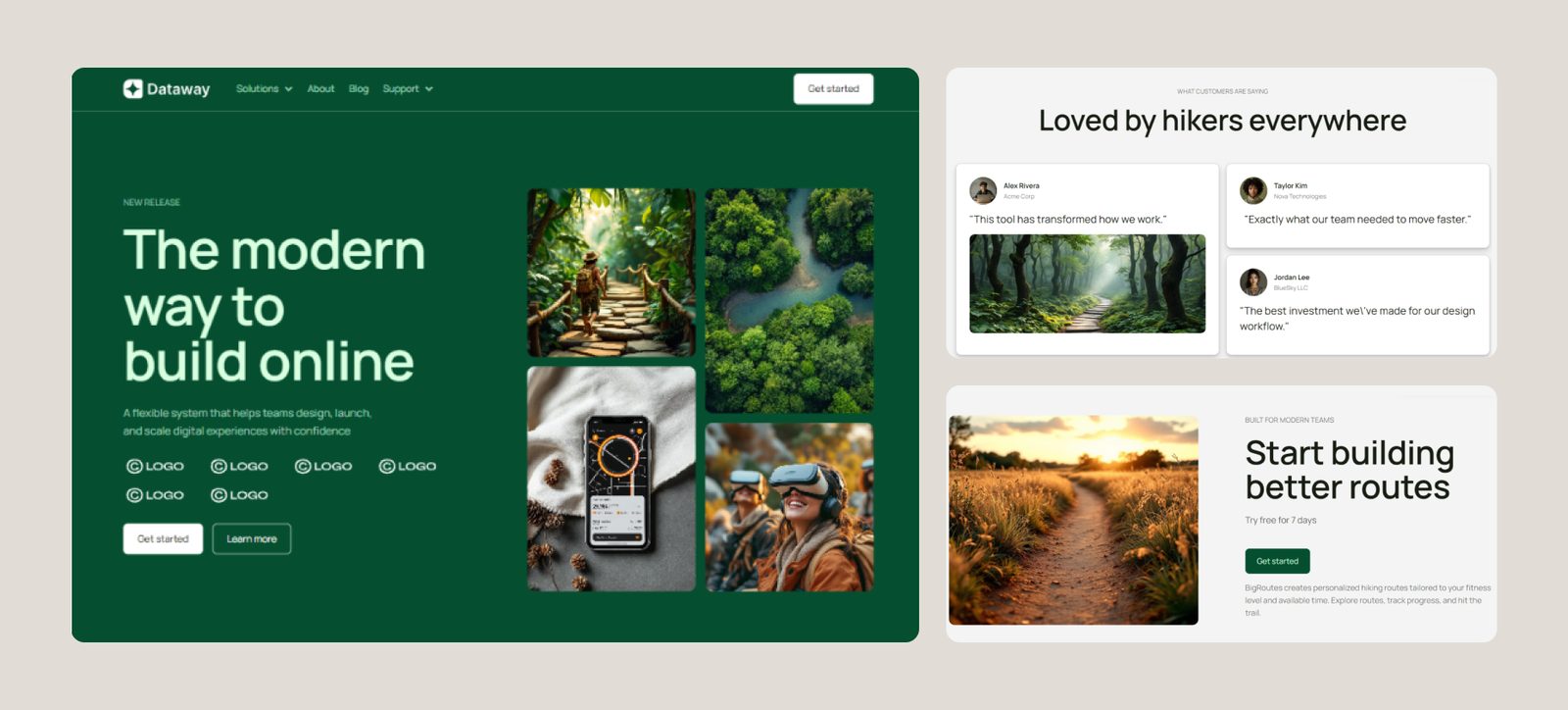
Webflow is another established website builder that has brought AI into its design workflow. Before, you had to manually create projects from scratch or use a template. Now, Webflow AI can do the initial work for you. Keep in mind the AI site builder limits how many pages you can create at the start.
Webflow has its built-in CMS, which is useful when your website grows. Say your SaaS company has a blog. You can create reusable page templates and add new content without designing each page separately.
One more thing about Webflow: its AI site builder doesn’t consume Webflow AI credits. The same goes for its app builder. Other AI features may use credits, though.
Webflow AI works well for early prototypes, but experienced developers point out that complicated CMS setups require manual work. You can show clients a working prototype within hours after the first call. After that, you might still need to set up the CMS and forms, work on SEO, and more.
Consider Webflow AI if you have someone (preferably a professional) who can refine the generated design. It’s also a good option for companies that plan to add new pages or content in the near future.
Lovable
Best for turning a product idea into a working MVP
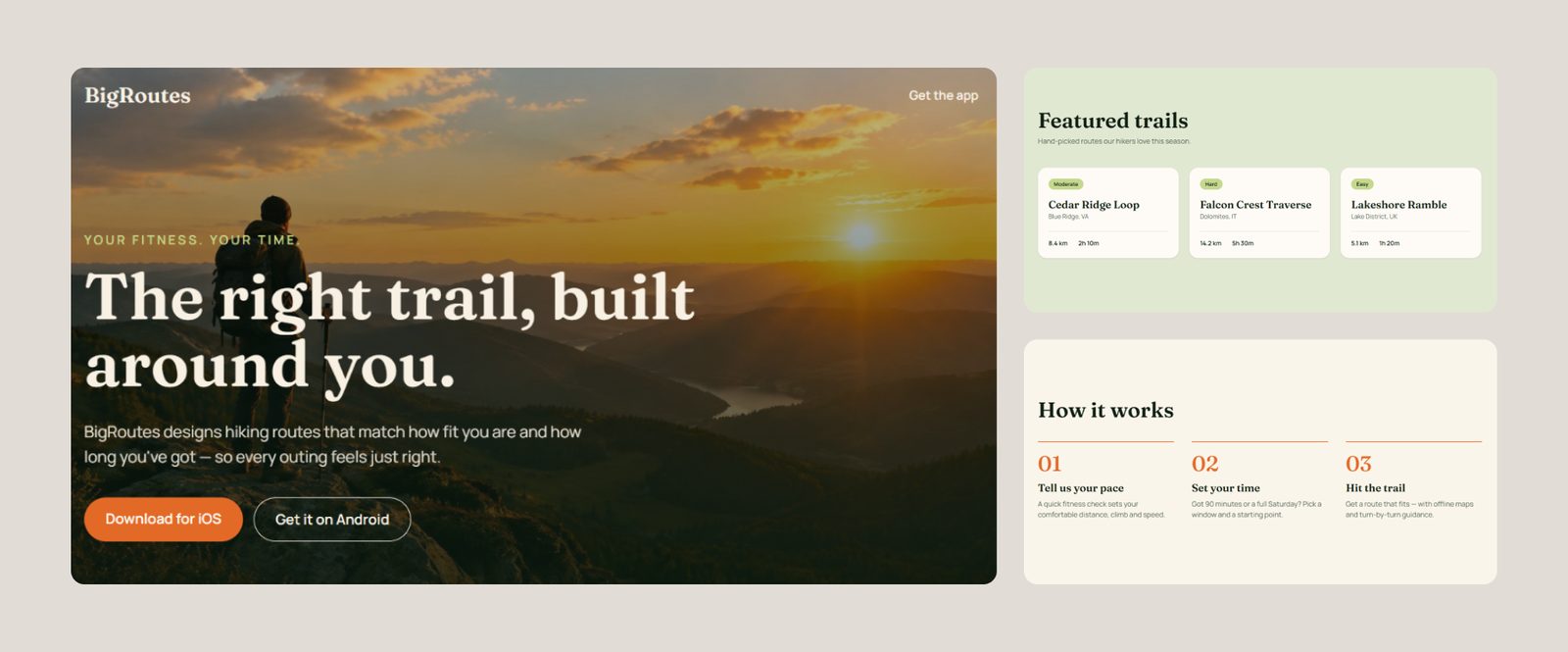
Lovable is probably one of the most well-known tools on this list, and for good reason. Released in November 2024, Lovable was used to create more than 60 million projects. According to Forbes, the company reached $100 million in annual recurring revenue in eight months after launch.
With Lovable, you can create websites, interactive prototypes, or internal tools, like campaign dashboards or ROI calculators. When you are ready, publish your project through Lovable and connect a custom domain. If you want to continue development elsewhere, sync the project with GitHub and hand it over to a developer.
Lovable can handle frontend and backend development, even if you don't know how to code. The company's 2026 user research states that four in five Lovable users come from nontechnical backgrounds.
People love Lovable’s UI quality (sorry for the tautology here), but some complain that it's hard to predict credit consumption. One reviewer who’s built several projects on it describes Lovable as fast and reliable on the standard parts (basic data, logins, payments). Custom workflows or permission roles might take a bit more work.
Consider Lovable if you want to go from an idea to a working MVP without a team of developers. It’s also a good fit for people with zero coding experience, like marketers and other non-coders.
Bolt.new
Best for building websites from designs you've already made
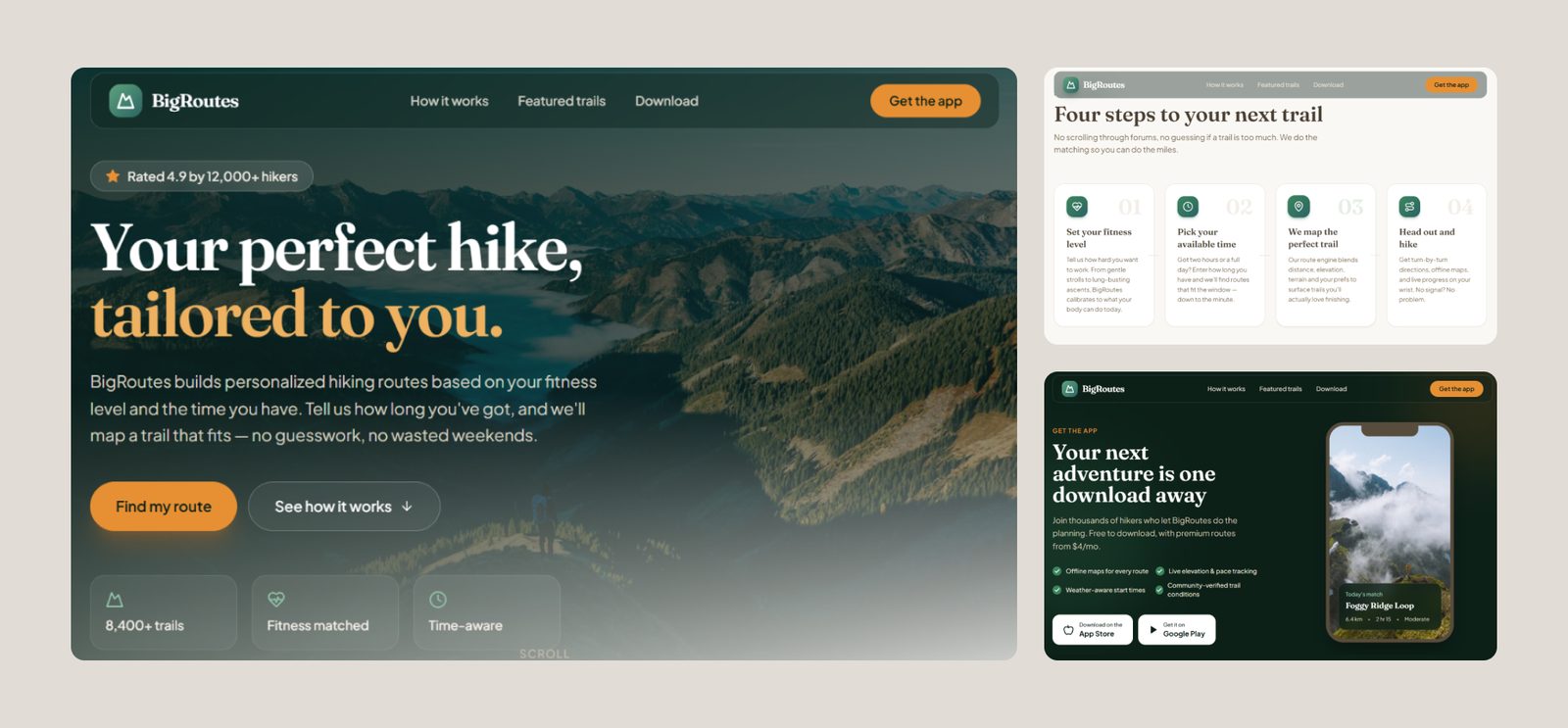
Bolt.new launched in October 2024 as an AI builder for websites and web apps. Today, you can also use it to build mobile apps with its Expo integration. Describe what you want, click Build now, and Bolt generates a working project. If you’ve already started something in another tool, you can import designs from Figma or Google Stitch, or bring in an existing project from GitHub or Lovable. After all, why explain the same design to AI twice?
When it's time to make changes, Bolt gives you a few options. With Plan Mode, you can discuss a feature or troubleshoot a problem before AI changes your code. Visual Edits lets you click on elements and adjust their appearance directly. And if you're comfortable with code, you can open the editor and make changes yourself.
Judging by user reviews, Bolt speeds prototyping from weeks to hours. But people also mention unexpected changes to existing functionality and frustrating debugging loops. One Reddit user described how a small edit affected unrelated parts of their project. And every attempt to fix the problem can eat up more tokens.
Consider Bolt.new if you've designed your website in Figma or Google Stitch and want to turn it into a working project without starting over.

Get the week’s best stories
The best AI website builders, minus the long explanations
If you’ve forgotten what each tool does well, here’s a quick recap.
| Tool | Best for | Watch out for |
|---|---|---|
| Framer | Marketing sites with custom layouts and animation | Learning curve, credits burn fast |
| Figma Make | Testing ideas with clickable prototypes | Doesn’t always respect your design system |
| Google Stitch | Exploring different UI directions fast | Output can look generic |
| v0 by Vercel | Teams comfortable with code | Backend features may need a developer |
| Relume | Planning multi-page marketing sites from a clear structure | Wireframes can repeat layouts |
| Webflow AI | Marketing sites that keep growing | CMS, forms, SEO may need manual work |
| Lovable | Turning an idea into a working MVP | Credit use is hard to predict |
| Bolt.new | Building from designs you’ve already made | Edits can break unrelated parts |
AI website builders can save your time. But they won’t do all the work for you. You need to decide what you leave to AI and where it depends on your human decisions.
AI builders still need your input
We read dozens of user experiences while researching these tools. And let's say the five-minute AI magic doesn't always last. Here are the most common complaints.
- Your website might look like everyone else's.
Remember those familiar gradients and rounded cards? AI uses them as defaults, and a few prompts won’t make them feel like your brand.
- AI doesn't know your business.
Even with a detailed prompt, an AI builder can miss what your audience cares about and how your site should speak to it.
- The first draft is fast. The tenth revision? Maybe not.
Small changes can turn into long conversations with AI. As a result, you may spend some of the time you saved on fixing the output.
- Costs might become unpredictable.
Some AI tools charge for every prompt or action, so repeated revisions can eat into your budget. Sometimes AI breaks a layout it previously built, and you pay to fix it.
Does that mean you should stay away from AI website builders? Of course not. Hand on heart, we use AI tools for design every day. The difference is how we use them.
AI helps. We decide
At Habitat, AI supports every stage of website design, but the final calls are always human:
- AI analyzes client briefs and research materials to help us identify gaps. Then we come prepared with the right questions.
- We use AI to turn discovery notes into page structures and wireframes, so clients can review layouts sooner.
- AI helps us generate imagery and motion to bring our designers' ideas to life faster.
- AI speeds up coding and integration. Our engineers review and test the results.
- We provide design files and, when needed, code repositories that clients can continue working with.
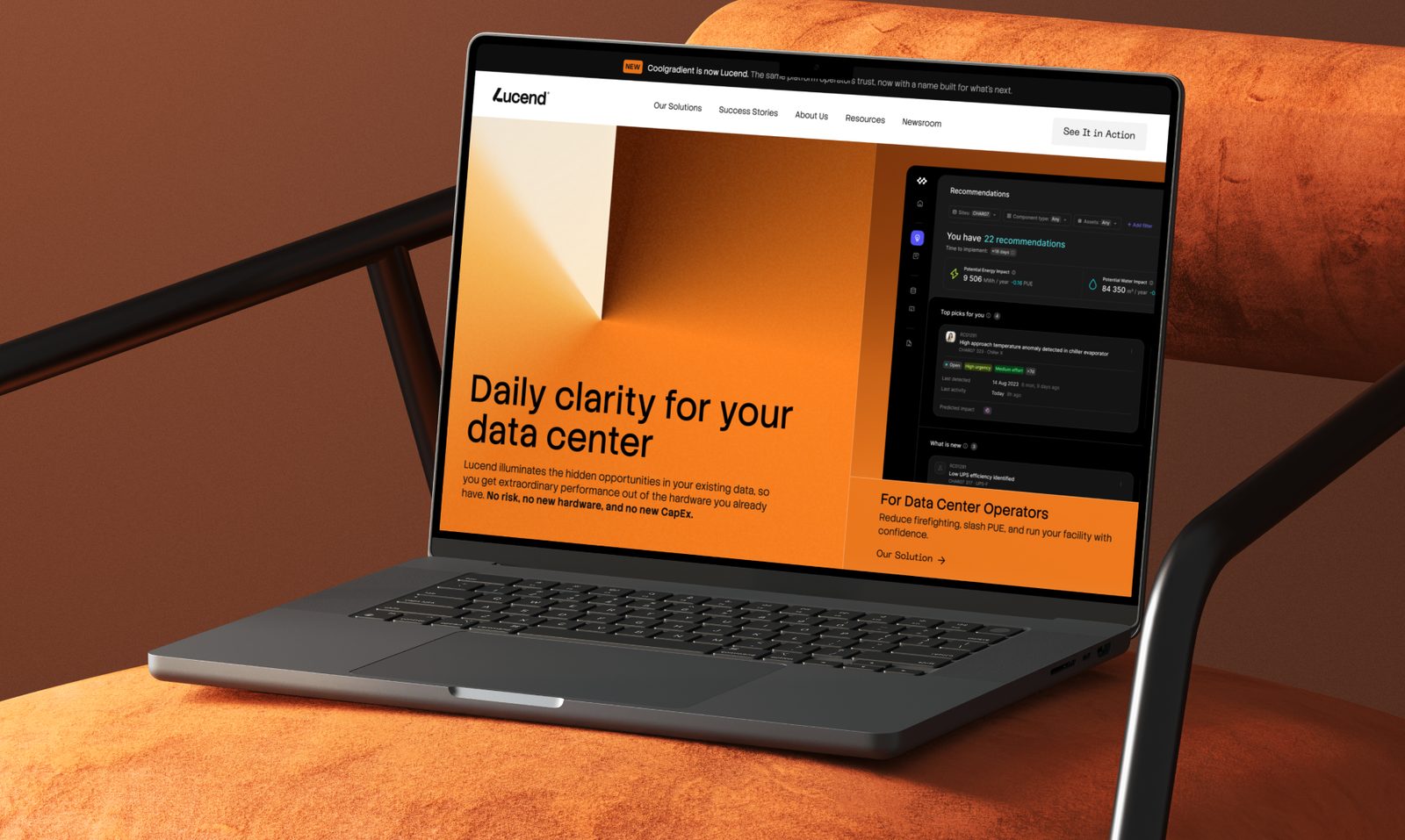
This way, we move faster, but this speed doesn’t cost us quality. AI takes repeatable work off our hands. We cover parts that need human expertise. And the results go beyond a good-looking website. For Lucend, we designed the brand, website and a clickable prototype that won their first clients before launch and helped them raise $3.3M.
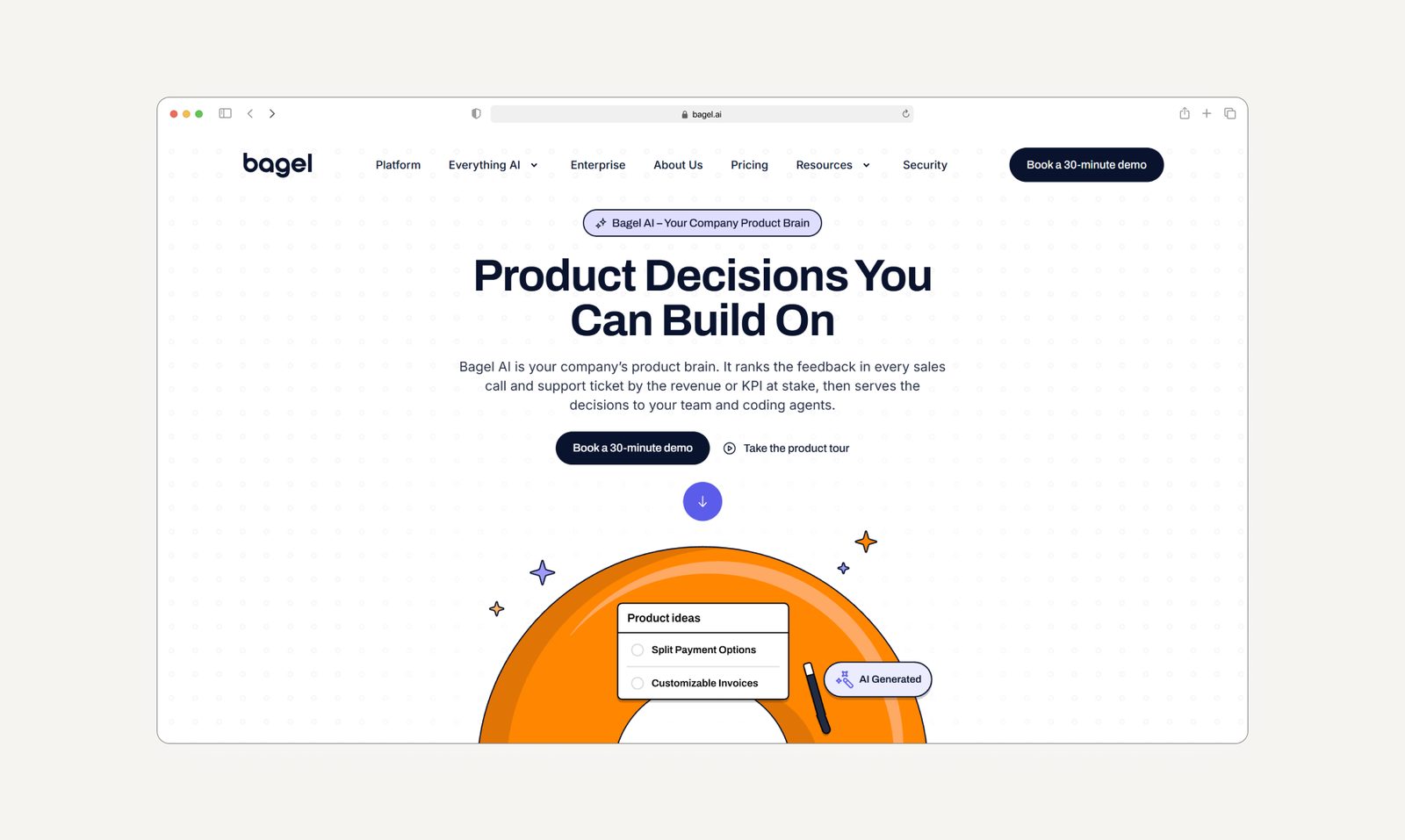
One more example is Bagel AI, an AI-native product velocity platform. Their site didn’t bring in demos, so we rebuilt it from the ground up. Within a week of launch, new users jumped 1,185%, and the site became their top pipeline source. Bagel AI closed a $5.5M seed round the same month it went live.
Wondering what we could do for your website? Book a free audit, and we'll review your product and suggest specific improvements. If you’ve already built something with AI, we'd love to see that, too.